








Disclosure: we make SLA Alerts, one of the Power-Ups compared below. The due-date and automation sections work without any Power-Up, and we say where they are enough. We checked Trello's behaviour against Atlassian's support pages and every Power-Up against its own directory listing in October 2026.
Two ways to put an SLA on a Trello board
On a Trello board an SLA usually means "a card shouldn't sit in this stage longer than X": a new request answered within 4 hours, a proof approved within 2 days, a job through production within a week. Trello has no SLA feature, so teams build one of two things.
- A deadline on each card. The card's due date, set by hand or by automation when the card arrives. Native, free, and what most forum answers suggest.
- A time limit on each list. Every card in "Waiting on client" gets the same 2 days, counted from when it entered the list. Trello can't do this on its own, so it takes a Power-Up.
| Due dates + automation | Time limit per list (Power-Up) | |
|---|---|---|
| Belongs to | The card | The stage |
| Card moves to the next stage | Needs another rule to reset the date | A new clock starts by itself |
| Card's real deadline | Overwritten by the SLA date | Left alone |
| Working hours | Working days only | Depends on the Power-Up |
| Who hears about it | Card members with a reminder set, or what a rule posts | Depends on the Power-Up |
| Cost | Free; automation runs count against a monthly quota | From free to a few dollars a month, per person or flat |
Due dates: what Trello does natively
A due date on a card changes colour as it approaches. Per Atlassian's dates page, the badge is light grey while the date is more than 24 hours away, yellow within 24 hours, red when it has just become overdue, and light pink once it is more than 24 hours overdue. A notification only goes out if a reminder was set on the date: "You must set a due date reminder in order to receive a due date notification."
Automation sets the dates for you. A rule such as when a card is moved into list "New requests", set due date in 1 working day gives each new card a deadline, and due-date automations can then act around it, for example posting a comment or adding a label once a card is overdue. It works on every plan, within the Workspace's monthly runs: 250 on Free, 1,000 on Standard, unlimited on Premium (quotas).
Where due dates stop working as an SLA
- The card has one due date. If a client deadline lives in it, the SLA rule overwrites it. If the SLA lives in it, the real deadline has nowhere to go.
- It doesn't follow the stage. When the card moves from "Design" to "Waiting on client", the old date still stands until another rule changes it. Three stages with their own targets means three rules, and every edit to the workflow means editing them.
- It can't pause. A 2022 thread asked how to stop the clock while waiting for a customer; the suggestions involved card buttons, Custom Fields and another Power-Up, because, as one reply put it, "I have not figure out a way to get difference two two dates using Trello automation" (thread).
- Working days, not working hours. In a 2019 thread a support team found that a ticket arriving at 7pm became due at 7pm two working days later, outside their 9-to-5: "the only option we have is to set it to business/working days and not working hours." Business-hours SLAs covers this in detail.
Due dates are enough when each card has one deadline that matters, the board has one or two stages with a target, and the people on the card set their own reminders. Our Trello help desk guide shows that setup for a small support queue.
Time limits on lists: what changes
A limit on a list measures what an SLA usually means: how long a card has been in this stage. It starts when the card arrives, starts again when it moves on, and doesn't touch the due date. Before choosing a Power-Up, check four things:
- What it counts. Time in a list, or a timer with start, pause and stop conditions you define.
- Which clock. Calendar time, or your working hours and days. Holidays too, if you need them.
- Who hears about it, and where. A colour on the board, a comment that @mentions someone, email, Slack.
- What it does to your cards. Some move or label late cards on purpose; others only report.
SLA and time-in-list Power-Ups compared (October 2026)
Features are from each directory listing as of October 2026. Where a listing doesn't mention something, the table says so rather than guessing.
| Power-Up | What it times | Working hours | Alerts | Price (Oct 2026) |
|---|---|---|---|---|
| SLA Timers & Deadlines by Alaryx Tech | SLA timers that start, pause and finish on list and title-keyword conditions; can be adjusted on the card | Yes, calendars with public holidays and days off | Badges and sorting by urgency; listing doesn't mention comments or Slack | Not stated in the listing |
| SLALane by CHPX | Policies: past due, or more than N hours in a list | Not mentioned | On breach: label, move and comment; email escalation ladder; Slack on Pro | Free for one policy on one board; Pro US$5 a month or US$50 a year |
| SLAs for Trello | SLAs with start and stop conditions by list | Not mentioned | Running SLAs on the card front | Free; "no longer in active development" |
| Card Time In List by GTOLA | Time in list | Yes (Premium), plus excluded days | Colour ranges on the badge (Premium) | Badge free; Premium $10 per member a year |
| Time in List by Blue Cat | Time in list, past lists, averages per list | Not mentioned | Not mentioned | $3 per member a month or $30 a year |
| Durations (Tiny Power-Ups Club) | Time in list, on the board, until due | Not mentioned | Custom threshold colours | $2 per user a month or $20 a year |
| SLA Alerts (ours) | Time in list against a named limit per list, in hours or days | Yes, per board and time zone, different hours per day; no holiday calendar | Comment that @mentions the card's members; Slack webhook; yellow and red badges | €5 a month or €50 a year per workspace |
For a team of ten, the per-person tools come to $30 a month (Blue Cat), $20 (Durations) or about $8 (GTOLA Premium, billed yearly). SLALane Pro and SLA Alerts are flat prices that don't change with the team.
Which one fits
- One deadline per card, one or two targets: stay with due dates and an automation rule. It costs nothing and every Trello user already understands the colours.
- You only want to see waiting time: a time-in-list badge (GTOLA's free one, Durations or Blue Cat) is enough. See time in list in Trello.
- Timers that pause on conditions, holidays, per-agent statistics: SLA Timers & Deadlines is built for that, for support and IT teams with formal targets.
- Late cards should be moved or labelled automatically, with an escalation ladder: SLALane does that, and its free tier covers one policy on one board.
- A limit per list, counted in working hours, and the card's own people told in Trello: that is what we built SLA Alerts for.
How SLA Alerts handles it
In SLA Alerts a limit has a name, such as Client reply or Production, a length in hours or days, and the lists it covers. Several lists can share one limit; each list answers to one limit at a time. You choose whether it counts working hours only or every hour, and whether to warn with 10, 25 or 50% of the limit left.
- On the board, cards under a limit count down: plain while there's time, yellow once the warning point is passed, red and how far over once the limit is. Any list can be sorted by SLA urgency, late cards first.
- The alert is a Trello comment that @mentions the card's members, so Trello notifies them the way it always does. A card with no members mentions the person who saved the limit. It reads like
@samw ⚠ This card has been in Waiting on client for 2d 4h — 3h over (limit: 2 business days). Add a Slack incoming webhook and the same line goes to a channel, with a link to the card. - Once, not over and over: at most one warning and one alert per stay in a list. A card that leaves and comes back starts a new stay. Cards already over a limit when you save it turn red without an alert, so a new limit on a busy board doesn't post thirty comments at once.
- Needs attention lists every card past its limit or close to it, across all lists, most urgent first, filtered by Over, Due soon or a single list.
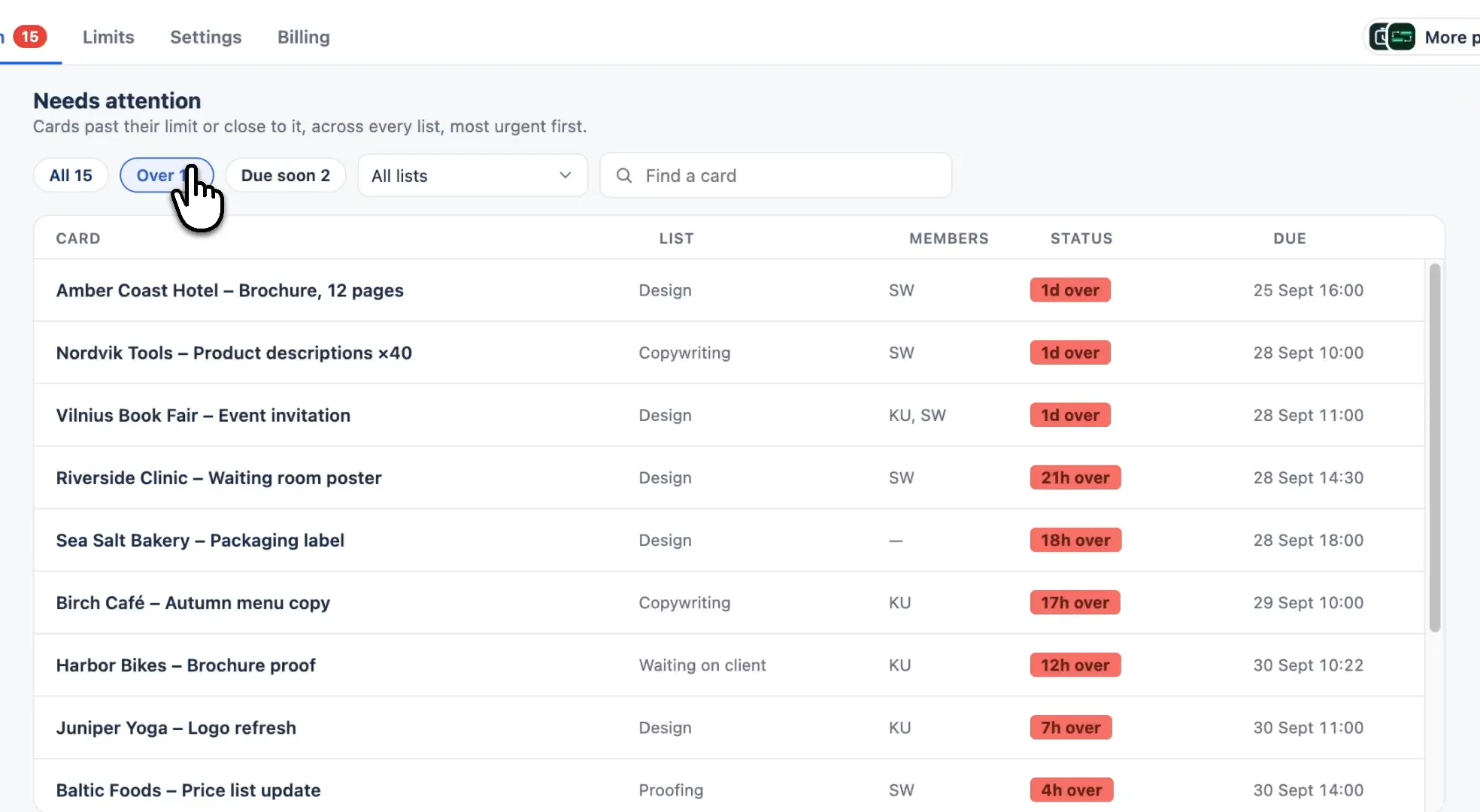
What it doesn't do: it never moves, edits or deletes a card, so if you want late cards moved to an "At risk" list, use a Trello automation rule on top or a tool like SLALane. It has no holiday calendar and no pause conditions besides working hours, and it doesn't produce statistics per agent. The FAQ on the product page has the rest.
A time limit on every list that matters
Set “Doing: 2 business days” once. Cards count down on the board, and their members are told in Trello or Slack before anyone has to go looking.
Add to Trello€5 per month for the whole workspace · 5-day free trial · No card needed
Frequently asked questions
Does Trello have SLA tracking?
No. Trello has due dates, which turn yellow within 24 hours and red once overdue, and automation that can set them. An SLA per stage, counted from when a card enters a list, needs a Power-Up.
Can Trello automation set an SLA due date in working hours?
No. Automation can set a due date a number of working days ahead, but not working hours, so a request that arrives in the evening is due in the evening. Business-hours targets need a Power-Up with a working-hours clock.
What happens to the SLA when a card moves to the next list?
With a due date, nothing: the old date stays until another rule changes it. With a time limit per list, the clock for the old list stops and the new list's clock starts, if it has a limit.
Is there a free SLA Power-Up for Trello?
SLAs for Trello is free but no longer in active development. SLALane is free for one policy on one board. Card Time In List by GTOLA has a free time-in-list badge, with colour ranges and working hours in its paid tier.
Who gets notified when a card breaks its SLA?
With due dates, card members who set a reminder, or whatever an automation rule posts. In SLA Alerts, a comment @mentions the card's members (or the person who saved the limit, if the card has none), and a Slack channel can get the same alert.