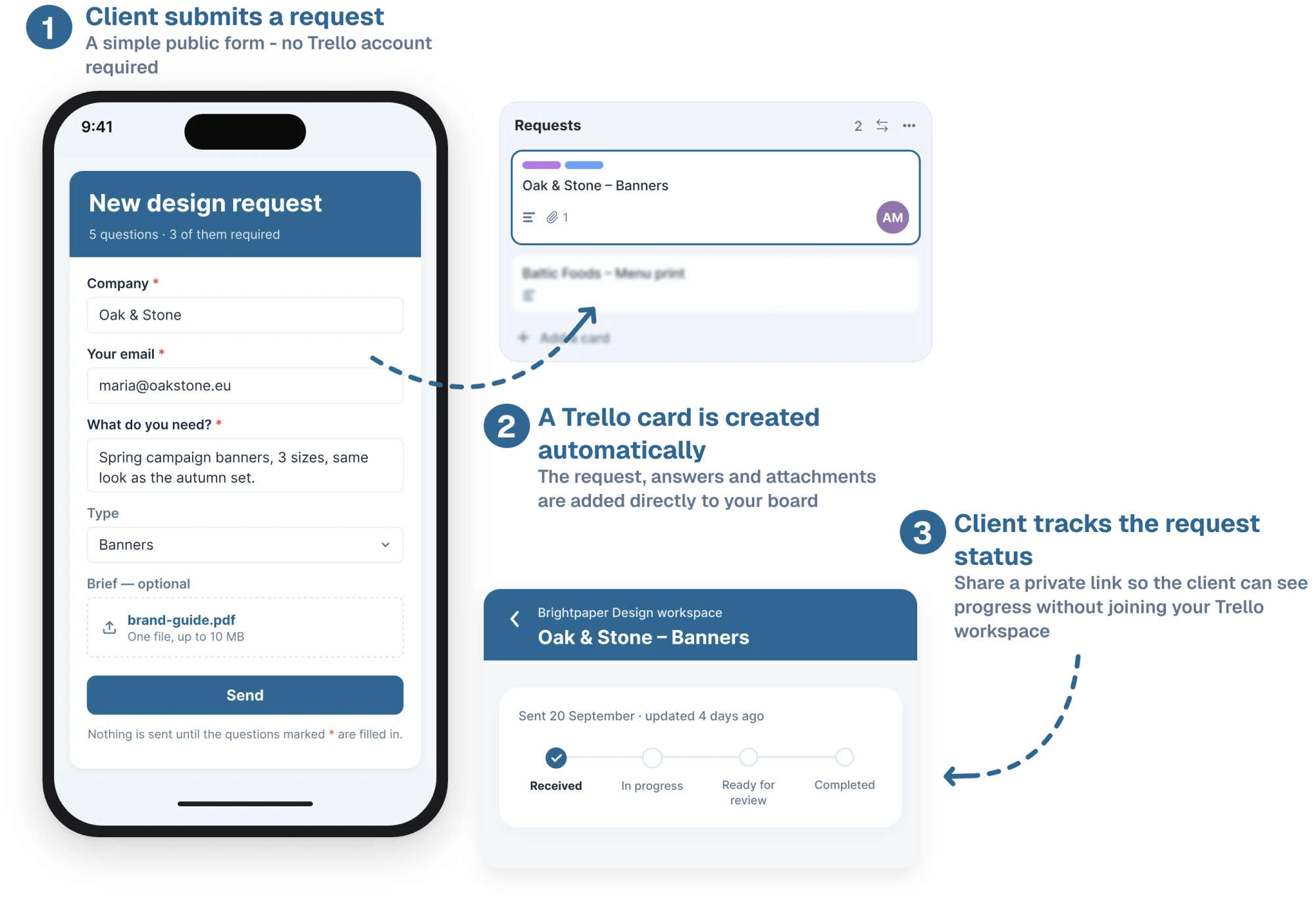
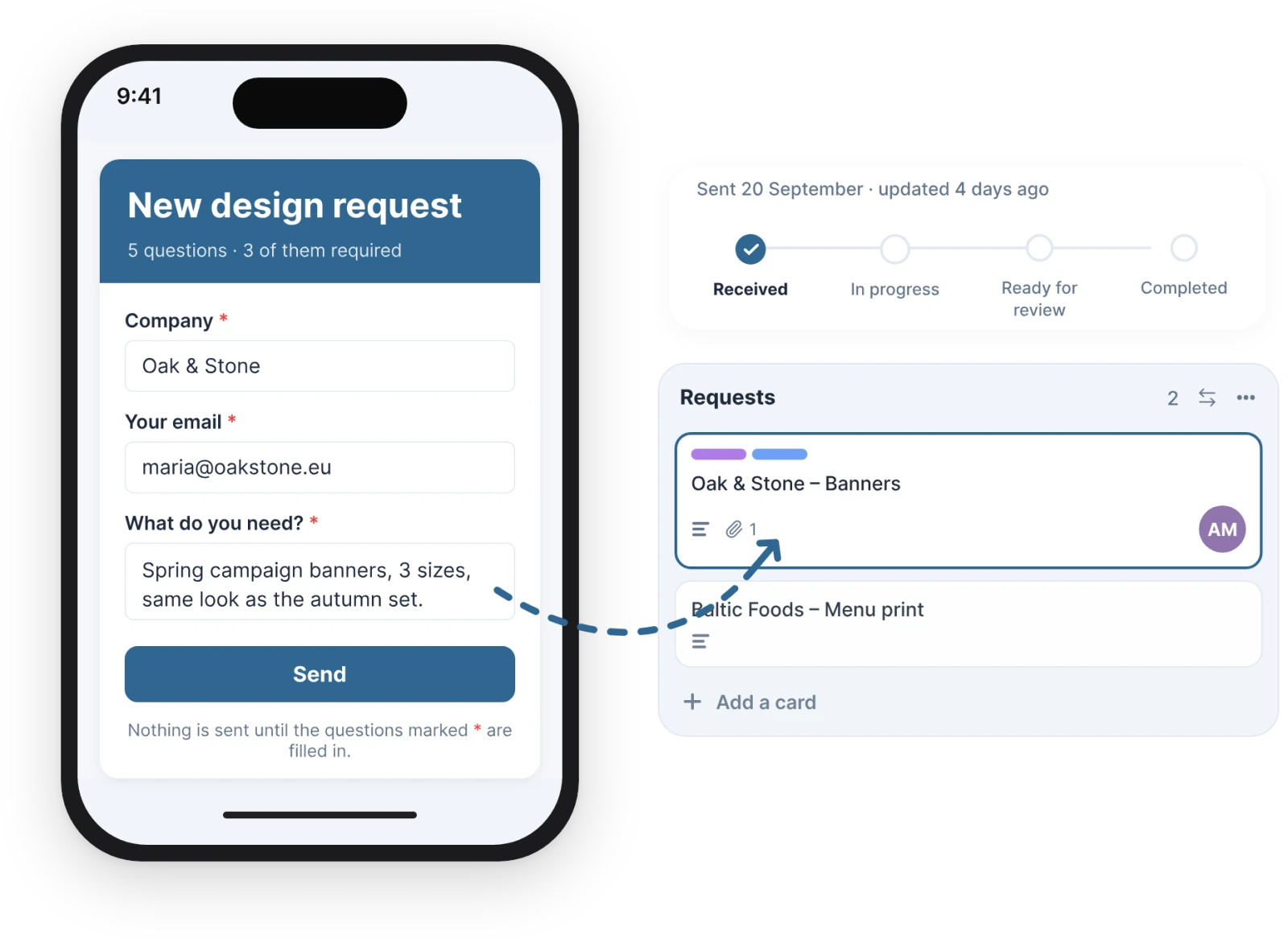
Share one link and every answer becomes a card, files attached. Your client follows it on their own page, talks to your team and approves the work. No Trello account, no seat.
Two things you set up in Trello, and two you do with your client. Pick one to watch it.
Start from Project request, Support request or Feedback, then change the questions, the list, labels and members. Publish, and copy the link, email it to your client, or open the form to see it as they will. Tick Client email on their address, and they get a link to follow the request.
On the Portal tab, give each list the stage your client should see, and hide the ones that are only yours, like Waiting on Lina. Keep Received, In progress and Completed, or add your own, like Ready for review. Every board in the workspace speaks the same set.
Write your question in the card’s Client section, then use Ask to approve… to pick the files they should see and where the card goes when they approve or ask for changes. They get an email, and a page with only those files.
They press Approve or Request changes on their page. A comment records the answer, the badge on the card front changes, and the card moves to the list you picked.
Click Share on a card and your client gets a page of their own, with only the parts that are theirs.
A card from a form with a Client email question is shared automatically. Any other card, click Share in its Client section.
No Trello account, no password. Lost it? Send a new one from the card.
Every request they have with you on one page, with its stage and your messages.
Their answer shows on the card, and the card moves to the list you chose.
The small things you’d only notice if they were missing.
One column, big targets, and a date picker the phone already knows.
Pause a form and its link stops taking answers. Publish again and it’s back.
If a card can’t be made, the form says so in the list, and one click fixes it.
A hidden trap field and a limit on answers per visitor and per form.
A client types their email and a fresh link arrives. The old one stops working.
The card back shows every client on it, when they last looked and what stage they see.
Awaiting, Approved or Changes, so the board shows what is signed off.
No answer after three working days? One reminder goes out by itself.
Every board, every member, as many forms and answers as you need. The price doesn’t change with the number of clients, and your clients never need a seat.
When the trial ends, nothing you collected goes anywhere.
5 daysFrom the day you publish your first form. No card.
Clients, cards, billing: the short answers. Still stuck?
Email supportNo. They open the form from a link and fill it in, and their page opens from a link too. There’s nothing to sign up for and no password to remember. They’re never added to your board, so they don’t count towards a free workspace’s 10 collaborators.
The person who published the form. The card is made with their Trello connection, so Trello’s activity shows their name. The same goes for comments: the client’s messages are posted by a team member, which is why every one of them starts with “From client” and the client’s email address.
That can happen if the list was archived, the person who published the form left the board, or their Trello access was revoked. The visitor is told the form is temporarily unavailable, and the answer is recorded as failed so it doesn’t go missing. In your list of forms, that form shows a warning with a Reconnect button. One click connects it again.
Yes. Every card has a Client section on its back. Click Share, type the client’s email, and they get a link to their page with that card on it. The same section shows who can see the card, when they last opened it, and the stage they see. Stop sharing takes it off their page.
Yes. On the card, write what you’d like approved and choose Ask to approve…. Pick which of the card’s files they may open, and the list the card moves to if they approve or ask for changes. They get an email, see the pictures on their page, and press Approve or Request changes, which needs a few words on what should change and can carry files. The card moves on its own, a comment records the answer, and its front shows Awaiting, Approved or Changes. If nobody answers, they get one reminder after three working days.

No. They see the card’s title, the stage you gave its list, their own answers, the messages you send them from the card’s Client section, and the files you pick for an approval. The description, checklists, your team’s comments and every other file stay on the board. This is checked on the server for every request the page makes.
When a request comes in or is shared with them, when it moves to a list with a different stage (at most one email an hour per request, with the stage it has by then), when you write to them, and when you ask them to approve something, with one reminder if they haven’t answered after three working days. Several messages within five minutes go out as one email. Moves into a hidden list send nothing. You can switch stage emails off for the whole workspace, and each client can switch off their own emails with one click.
One subscription covers the whole Trello workspace, with every board, every member and as many forms and answers as you need. It’s €10 a month or €100 a year. The 5-day trial starts when you publish your first form, not when you install the power-up, and it doesn’t ask for a card.
New answers stop. The form link still opens, but it tells the visitor the form isn’t accepting responses right now. It says nothing about payment, because your client sees that page, not you. The client page closes the same way and no emails go out. Your forms, their settings, every card and every past answer stay exactly where they are. Subscribe and it all works again.
One link for your clients, one card for your team, and one page where the client can check on it. Your first form takes about two minutes.
Add to Trello5-day free trial · No card to start · €10/month for the whole workspace
Paid · free trial
Free · no account