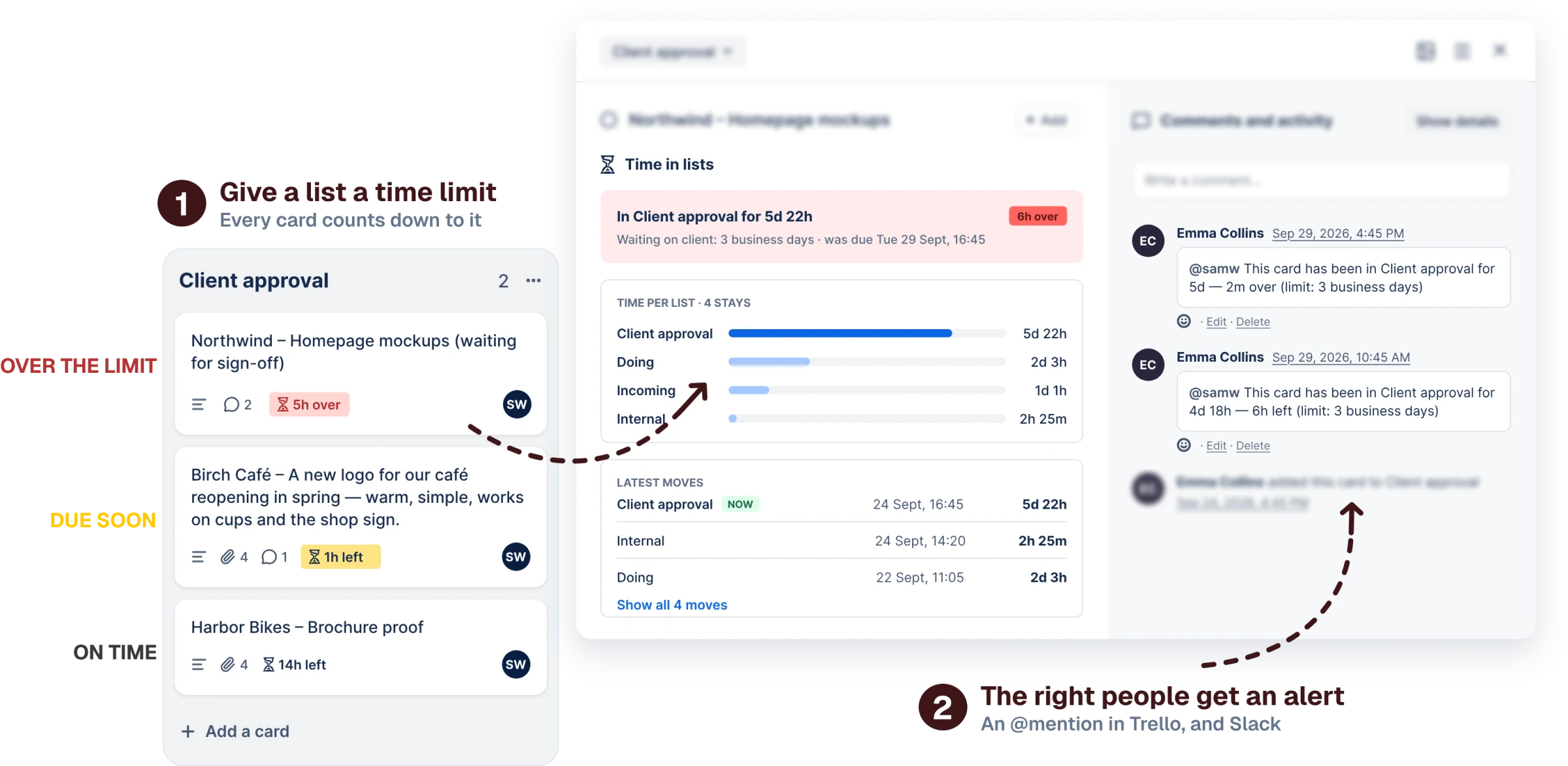
Set a limit like “Doing: 2 business days”. Cards count down on the board, and their members are told in Trello or Slack.
One rule in the SLA window, and the board keeps time for you. Pick a step to see it.
On the Limits tab, give a list one of your limits, or make a new one: a name like Production, its lists, how long, and when to warn. Your working hours are set once, in Settings.
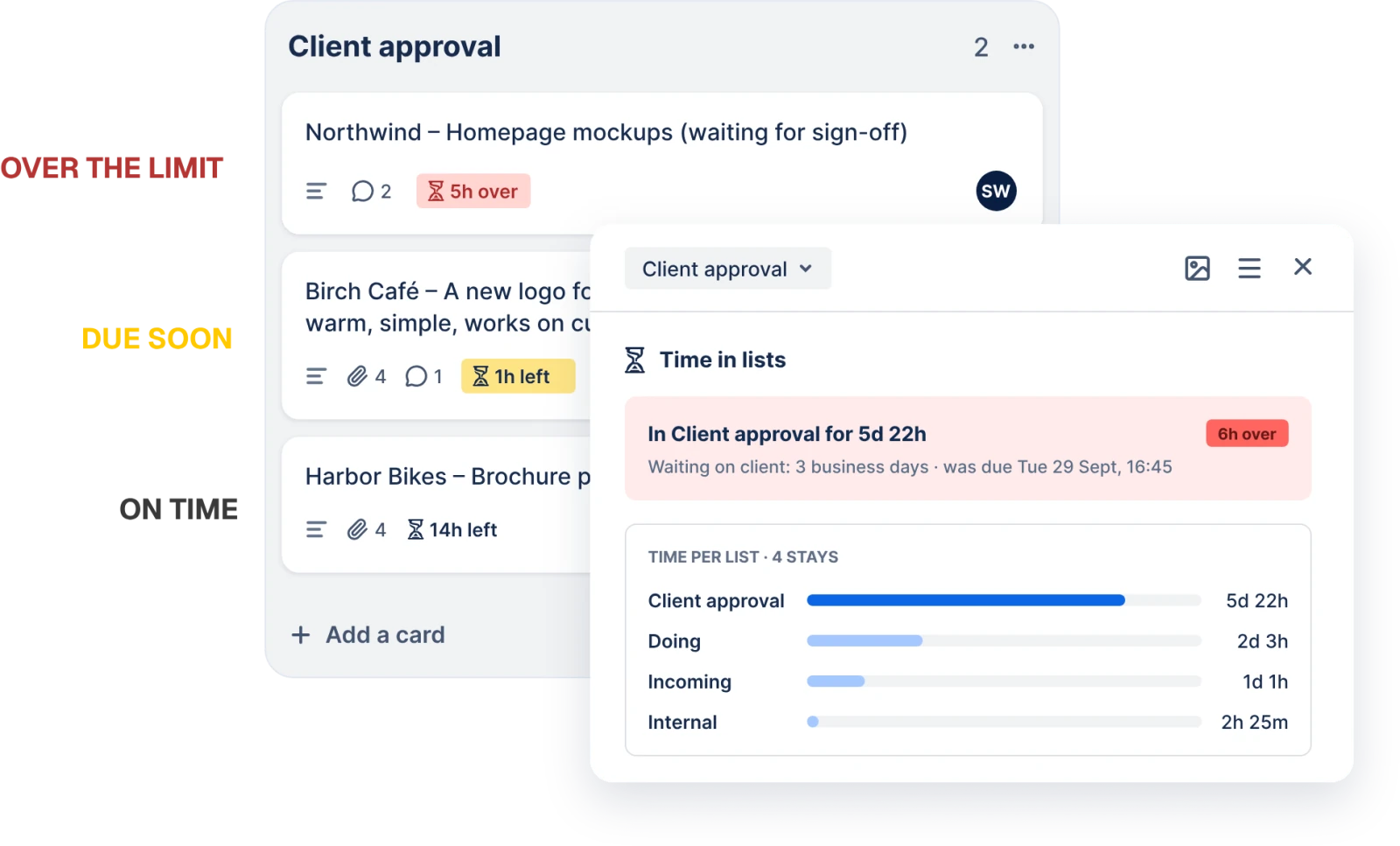
The badge counts down on the board: plain while there’s time, yellow as the limit nears, red once it’s passed. Then a comment @mentions the card’s members, so Trello tells them by email or on their phone. Slack too, if you add a channel.
The board button opens Needs attention: cards past their limit or close to it, across every list, the most urgent at the top. Click one and it opens.
The small things you’d only notice if they were missing.
Turn it on and cards already on the board show their time, read from up to 90 days of the board’s activity.
The back of each card totals its time per list and lists its latest moves, with when it arrived and how long it stayed.
Late cards first, then the ones due soonest. Cards with no limit keep their order at the bottom.
Badges only on cards in lists with a limit, or on every card. Your choice, per board.
Check the channel before the first real alert needs it.
An alert that didn’t go out shows next to its limit, with what went wrong.
If the person tracking the board leaves it, anyone on the board reconnects, and the moves in between are read back.
It never moves, edits or deletes a card. It only comments when a limit you set is near or passed.
Every board, every member, as many limits and cards as you have. The price doesn’t change when the team grows.
When the trial ends, your limits and history stay put.
5 daysFrom the day you save your first limit. No card.
Limits, alerts, billing: the short answers. Still stuck?
Email supportNo. The alert is a comment on the card that @mentions its members, so Trello notifies them the way it always does, by email or on their phone. Only the person who creates a limit needs to open the SLA window.
Comments are posted with the Trello connection of the person who last saved the limit, so Trello shows them as that person’s action. If the card has no members, that person is the one mentioned.
At most two per stay in a list: one warning as the limit nears (if you asked for one) and one when it’s passed. A card that moves out and comes back starts a new stay with a new clock. Cards that were already past a limit when you saved it turn red but aren’t announced, so a new limit on a busy board doesn’t post thirty comments at once.
Yes. A limit has a name and can cover as many lists as you like, and the Limits table lets you give any list one of the limits you already have. Each list answers to one limit at a time, and each card’s clock starts again when it moves to another list, even one under the same limit.
When you start tracking, SLA Alerts reads the board’s recent activity, up to 90 days back, to find when each card entered its list. A card whose move is older than that is dated from when it was created, and its time is marked with a “~”.
Each board has a time zone, working days and hours, Mon–Fri 09:00–17:00 unless you change them. A limit set to count working hours only stops outside them, and the card’s badge says when it resumes. One day of such a limit is one working day, so “2 days” on a 09:00–17:00 board is 16 working hours. A limit set to count every hour ignores working hours.
Which card entered which list, and when. Not card titles or descriptions. The Trello connection of the person tracking the board and of each limit’s author is stored encrypted, and so is a Slack webhook address. Stop tracking and recording stops; ask us and we delete a board’s history.
One subscription covers the whole Trello workspace, with every board and every member. It’s €5 a month or €50 a year. The 5-day trial starts when you save your first limit, not when you install the power-up, and it doesn’t ask for a card.
Alerts stop, and so do the countdowns, the colours and the Needs attention list. The back of every card still shows how long it has been in each list. Your limits, working hours and history stay, and the board keeps being recorded, so everything is current the moment you subscribe. Nothing that passed its limit in between is announced afterwards.
Put a limit on the lists that matter, and let the board tell you what’s late. Your first limit takes about thirty seconds.
Add to Trello5-day free trial · No card to start · €5/month for the whole workspace
Paid · free trial
Free · no account