








Disclosure: we make Client Forms & Portal, one of the form Power-Ups compared below. Most of the routes here work without it, and some cost nothing. Prices and limits come from each vendor's own page, checked in October 2026.
Does Trello have forms?
No. Trello has no form builder of its own. The closest built-in route is email-to-board, which turns an email into a card. For a real form, people outside your board fill in, you connect a form tool through Zapier or Make, or you add a form Power-Up that creates the card itself. The choice mostly comes down to three questions: where the files end up, who can see the answers afterwards, and what you pay per response.
| Route | Files | Card set-up | Price (as of October 2026) |
|---|---|---|---|
| Email-to-board | Attached to the card, 10 MB per email in total | Subject is the title, body the description, labels and members from the subject | Free |
| Google Forms + Zapier | In the form owner's Google Drive; the respondent must sign in to Google | Any list, title and description you map | Free for 100 tasks a month; Professional from $19.99/month billed yearly |
| Google Forms + Make | Same as above | Any list, title and description you map | Free for 1,000 credits a month; Core from $9/month |
| Jotform's Trello integration | Sent to the board; Starter keeps 100 MB of uploads | New card per submission, labels and due dates | Free for 100 submissions a month; Bronze $39/month or $34/month yearly |
| Forms by Blue Cat | None on Free; 5 MB on Basic, 50 MB on Pro | Answers mapped to card fields, Custom Fields included | Free for 10 responses a month; Basic $29 for 100 |
| Hipporello Service Desk | Not stated on its pricing page | Forms on a branded portal, with automations on Premium | Free for 5 cards a month; Premium $10 per agent per month |
| Client Forms & Portal (ours) | Attached to the card, 5 files of up to 10 MB per answer | List, labels, members and a title built from the answers | €10 per workspace per month or €100 per year |
The native route: email-to-board
Every board has an email address. Mail sent to it becomes a card: "The subject of the email becomes the card's title", the body becomes the description, and attachments land on the card along with the original email (Atlassian support). A #label or @username in the subject adds labels and members. There is an overall limit of 10 MB per email, attachments included.
It is not a form, though. The address belongs to you as a member, so every card arrives as if you created it, and anyone you give it to can drop cards onto your board. There are no required questions either, so you get whatever the sender chose to write. It works well for your own forwarding and for a form tool that can send an email. Our guide to email-to-board's limits goes further.
Trello's automation can tidy a card once it exists, for example adding a checklist when a card lands in Incoming, but it cannot receive a form submission. The Free plan includes 250 automation runs a month and Standard 1,000 (Trello pricing).
Google Forms with Zapier or Make
This is the answer most forum threads give. In a January 2024 thread someone asked "I need to integrate responses as a Trello card. Which power-up should I use?", and the replies pointed to Zapier first, with form Power-Ups as the alternative for anyone not tied to Google Forms.
- Build the form in Google Forms and send yourself one test response.
- Create a Zap with Google Forms' New Form Response as the trigger.
- Add Trello's Create Card as the action, pick the board and list, and map answers into the title and description.
- Test it, switch it on, and check the first real card.
It is flexible, and if you already pay for Zapier it costs little more. Three things are worth knowing first.
- Files need a Google account. Google says that "to answer this question, responders need to sign in to a Google Account", and uploads go to "a new folder on Google Drive" owned by the form's owner (Google Forms help). The card gets a link, not the file, and clients without a Google account can't attach anything.
- Every response costs a task. Zapier's free plan includes 100 tasks a month for two-step Zaps and checks for new responses every 15 minutes. Professional starts at $19.99 a month billed yearly ($29.99 monthly) for 750 tasks and checks every 2 minutes (Zapier pricing).
- Make is cheaper and fiddlier. Its free plan gives 1,000 credits a month, two active scenarios and a 15-minute interval. Core starts at $9 a month for 10,000 credits (Make pricing).
There is also a Google Forms Sync Power-Up that connects the two without Zapier. We haven't tested it, so check its listing for the current price and limits.
Form Power-Ups that create the card themselves
A form Power-Up keeps the form, the mapping and the card in one place, and nothing sits in between. Prices below are as listed by each vendor in October 2026.
Forms by Blue Cat
Forms by Blue Cat builds the form inside Trello and maps answers onto card fields, Custom Fields included, with conditional logic. The free plan allows unlimited forms but 10 responses a month and no file uploads. Basic costs $29 for 100 responses with 5 MB files, and Pro $59 for 1,000 responses with 50 MB files and your own branding (Blue Cat pricing). It fits teams whose cards rely on Custom Fields.
Jotform
Jotform is a full form builder, and its Trello integration can "convert form submissions into new Trello cards", add labels and due dates, and send file uploads to the board. The free Starter plan allows 5 forms, 100 submissions a month and 100 MB of uploads. Bronze costs $39 a month, or $34 a month billed yearly, for 1,000 submissions (Jotform pricing). It suits you if you already use Jotform for other forms, such as payments and signatures.
Hipporello Service Desk
Hipporello publishes your forms on a branded portal and turns each submission into a card. Its free plan includes unlimited public forms but only 5 cards a month. Premium removes the cap and adds private forms and automations for $10 a month per agent, which Hipporello defines as a Trello board member (Hipporello pricing). It is the closest to a help desk of the options here.
Where the files go, and who sees the answers
These two questions decide more than the price does, especially when clients send logos, contracts or screenshots.
| Route | Where uploaded files end up | Copies of the answers outside Trello |
|---|---|---|
| Email-to-board | On the card | In the sender's mailbox |
| Google Forms + Zapier or Make | The form owner's Google Drive, linked from the card | In Google Forms (and a Sheet, if linked) and the automation's run history |
| A form Power-Up or form builder | On the card, or in the vendor's storage, depending on the tool | Usually kept by the vendor as well |
| Client Forms & Portal | On the card, passed straight through to Trello and never stored by us | Only when the form asks for the client's email, so they can see their own answers on their page |
On the board, the answers land in the card description, so everyone who can open the board can read them. That is usually what you want for your team. It is also the reason not to invite clients onto the board to follow their requests, which our guide to a client portal without a Trello seat covers.
Which one to pick
- You only forward emails to yourself: email-to-board is free and good enough.
- You already run Google Forms and Zapier: keep them, as long as clients don't need to send files.
- Your cards depend on Custom Fields: Forms by Blue Cat maps onto them.
- You need payments, signatures or long multi-page forms: a full form builder such as Jotform.
- You run a support desk with agents and inboxes: Hipporello, or see our guide to a help desk in Trello.
- Clients send requests with files and want to follow them afterwards: that is what we built ours for.
How forms work in Client Forms & Portal
Client Forms & Portal builds the form in Trello and creates the card itself.
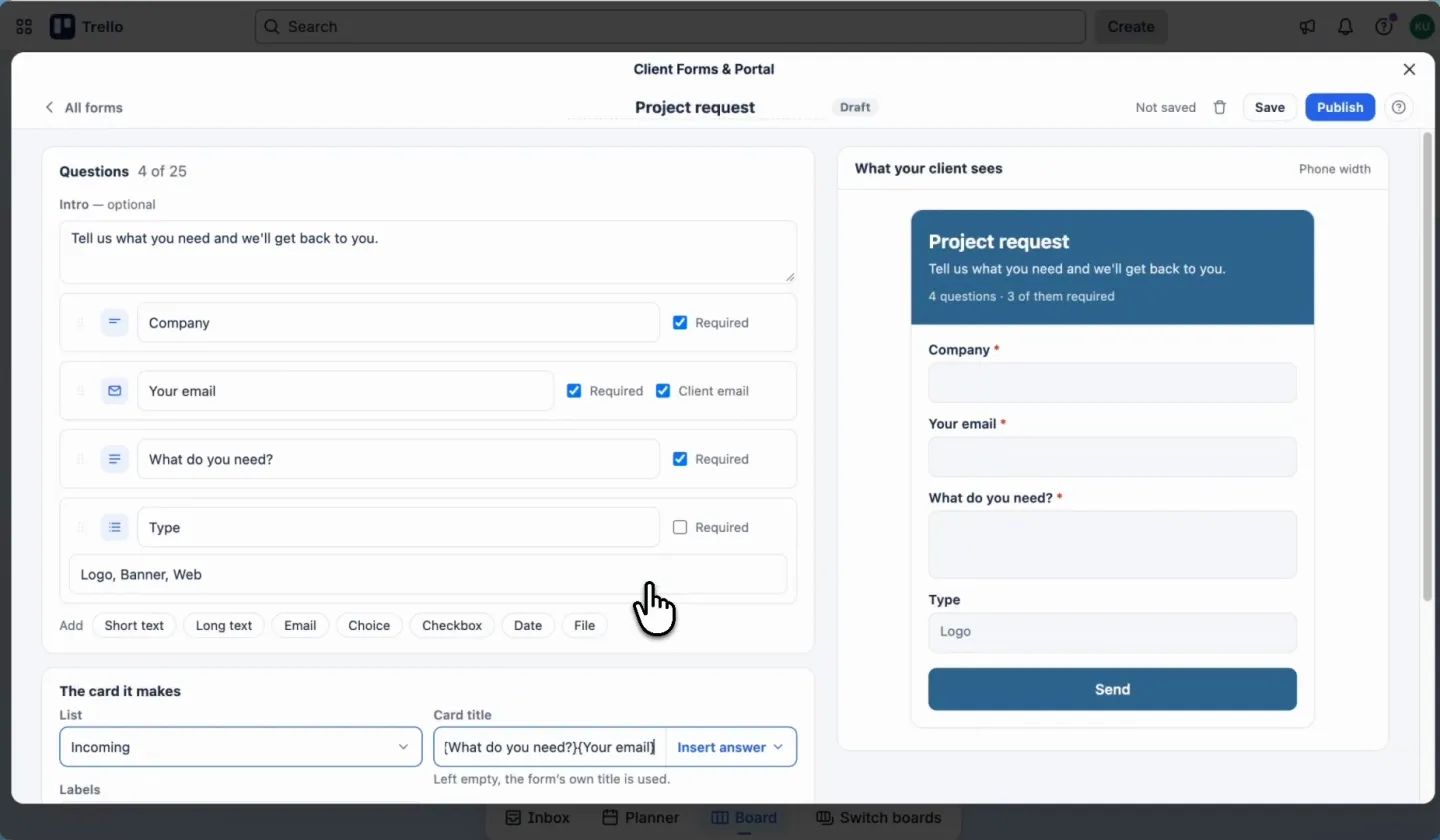
- Start from a template (Project request, Support request or Feedback) or a blank form, with up to 25 questions of seven kinds: short text, long text, email, choice, checkbox, date and file. Each can be required or not, and the preview shows the form at phone width as you build.
- The card is set up for you: the list it lands on, labels, members, and a title made from the answers, such as
{Company} – {What do you need?}. Every answer goes into the description under its question. - Files go onto the card: up to five per answer, 10 MB each. They pass straight through to Trello and are never stored on our side.
- No account for whoever fills it in. With a Client email question, they also get a private link to follow the request.
- Spam is kept out with a hidden trap field and a limit on answers per visitor and per form.
- Nothing goes missing. If a card can't be made, for example because the list was archived, the answer is recorded as failed and the form shows a warning in your list of forms, with a button to reconnect it.
- Pause a form and its link stops taking answers until you publish it again.
Cards are created with the Trello connection of the person who published the form, so Trello's activity shows them as the author. It costs €10 a month or €100 a year for the whole workspace, with unlimited forms and answers, and the 5-day trial starts with your first published form.
A form link that files cards on your board
Client Forms & Portal turns every answer into a card on the list you pick, with files attached, and gives your client a page to follow it.
Add to Trello€10 per month for the whole workspace · 5-day free trial · No card needed
Frequently asked questions
Does Trello have a built-in form?
No. Trello has no form builder. Email-to-board turns an email into a card, and everything else uses a form tool connected through Zapier or Make, or a form Power-Up that creates the card itself.
How do I turn Google Forms responses into Trello cards?
Use Zapier or Make. In Zapier, choose Google Forms' New Form Response as the trigger and Trello's Create Card as the action, then map the answers into the title and description. Zapier's free plan covers 100 responses a month, checked every 15 minutes.
Can people upload files to a Trello form without a Google account?
Not through Google Forms, whose file question requires the respondent to sign in to Google and stores files in the form owner's Drive. Form Power-Ups and builders such as Jotform accept uploads without a Google account. Client Forms & Portal attaches up to five files of 10 MB each straight to the card.
Can a form set labels and members on the Trello card?
Email-to-board can, with #label and @username in the subject. Zapier and Make can set them in the Create Card step. Most form Power-Ups, ours included, let you pick the list, labels and members per form, and build the card title from the answers.
Is there a free way to create Trello cards from a form?
Yes. Email-to-board is free on every plan. Zapier's free plan handles 100 responses a month and Make's 1,000 credits, Jotform's free plan 100 submissions, and Forms by Blue Cat 10 responses a month without file uploads.