








Disclosure: we make Card Priority, one of the Power-Ups compared below. Labels and Custom Fields are Trello's own and need nothing from us. We checked Trello's menus, plans and prices against Atlassian's support pages, and each Power-Up's price against its Trello listing or vendor page, in October 2026.
Does Trello have a priority field?
No. A Trello card has no built-in priority, unlike an issue in Jira. Teams use one of three things instead: labels, a Custom Field, or a Power-Up that adds a priority badge. They differ in which plan they need, whether the board filter can find them, and whether you can sort a list by them.
Trello's list menu sorts by name, due date and date created, and by a Custom Field only if it is a date or a number (Atlassian support). That one sentence decides a lot of what follows.
| Method | Trello plan | Sort a list by it | Board filter finds it |
|---|---|---|---|
| Priority labels | Any | No | Yes, by label |
| Dropdown Custom Field | Standard or higher | No, only date and number fields sort | Partly, by typing the value |
| Number Custom Field (1 to 4) | Standard or higher | Yes | Partly, by typing the value |
| Priority Power-Up | Any, plus the Power-Up's price | If it adds a sorter | No |
As of October 2026, Trello Standard costs $5 per user per month billed annually ($6 monthly), and the Free plan allows unlimited Power-Ups per board (Trello pricing).
Priority labels: free and filterable, not sortable
The most common setup is three or four labels, such as Urgent, High, Medium and Low, in one colour family. It works on every plan, the colours read from across the room, and the board filter finds every Urgent card in one click.
Where labels fall short for priority:
- Nothing stops two at once. A card can carry Urgent and Low together, and on a busy board someone will add one without removing the other.
- No order. Trello doesn't know that Urgent comes before Low, so there is no sort by label.
- They mix with everything else. Priority sits in the same strip as client names and work types. It helps to give urgency one colour family and nothing else, as in our label best practices for teams.
Labels are enough when you mostly need to filter: "show me everything Urgent" before a standup. If priority labels have to mean the same on several boards, keeping them identical is its own job; our guide to syncing labels across boards covers the options.
A Custom Field: one value per card, on Standard
Custom Fields fix the "two labels" problem: a field holds exactly one value per card. They are available on Standard and higher, not on Free, and come in five types: checkbox, date, dropdown, number and text. By default a field's value shows on the front of the card as well as the back (Atlassian support).
Most guides, including Atlassian's own Custom Fields lesson, use a dropdown with High, Medium and Low, each in its own colour. That reads well, but a dropdown can't be sorted: the list menu only sorts by date and number fields. If sorting matters, use a Number field named Priority with 1 for the most urgent. It looks plainer on the card, and Sort by puts the 1s together.
The board filter's keyword box searches Custom Field values, so typing a value finds the cards that have it; it can't filter by the field's name. Automation can read and set Custom Fields too, for example to set a default priority on new cards.
Sorting a list by priority
Whatever you use, Trello's Sort by is a one-off: it reorders the cards once, new cards land wherever they are added, and there is no undo other than moving the cards back by hand (Atlassian support). To keep a list in order, either sort it when you sit down to plan, or have a scheduled automation sort it each morning.
Power-Ups can add their own entries to the same Sort by menu (Trello developer docs). That is how a priority Power-Up sorts by levels Trello itself knows nothing about, on any plan.
Priority Power-Ups compared (October 2026)
A Power-Up keeps the priority in its own card data and draws it as a badge. The trade-off is the one in the first table: Trello's board filter and search don't read Power-Up data, so finding all P1 cards depends on what the Power-Up offers.
| Power-Up | Levels | Sort by priority | Price (Oct 2026) |
|---|---|---|---|
| Card Priority by Screenful | Custom names, with totals per list, assignee or label | Adds a list sorter | Paid since January 2026: 5-Power-Up bundle at $14.90/month or $99/year, 7-day trial |
| Card Priority Badge by Kryl Solutions | P1 to P4, Covey quadrants, custom labels, colours and icons | Premium | Badges free; Premium from $1/month for one board (personal) or $3/month (team), 14-day trial |
| Card Priority (ours) | P1 to P4, renamed and recoloured per board | Free | Free |
For totals, such as how many High cards each person has, Screenful's Power-Up shows them per list, assignee or label. For a priority matrix or charts, Kryl's Premium has them; note its listing treats boards with more than five users as commercial use, which brings occasional notices without a subscription. For badges and a sort with nothing to pay, Card Priority covers that and stops there.
How Card Priority works
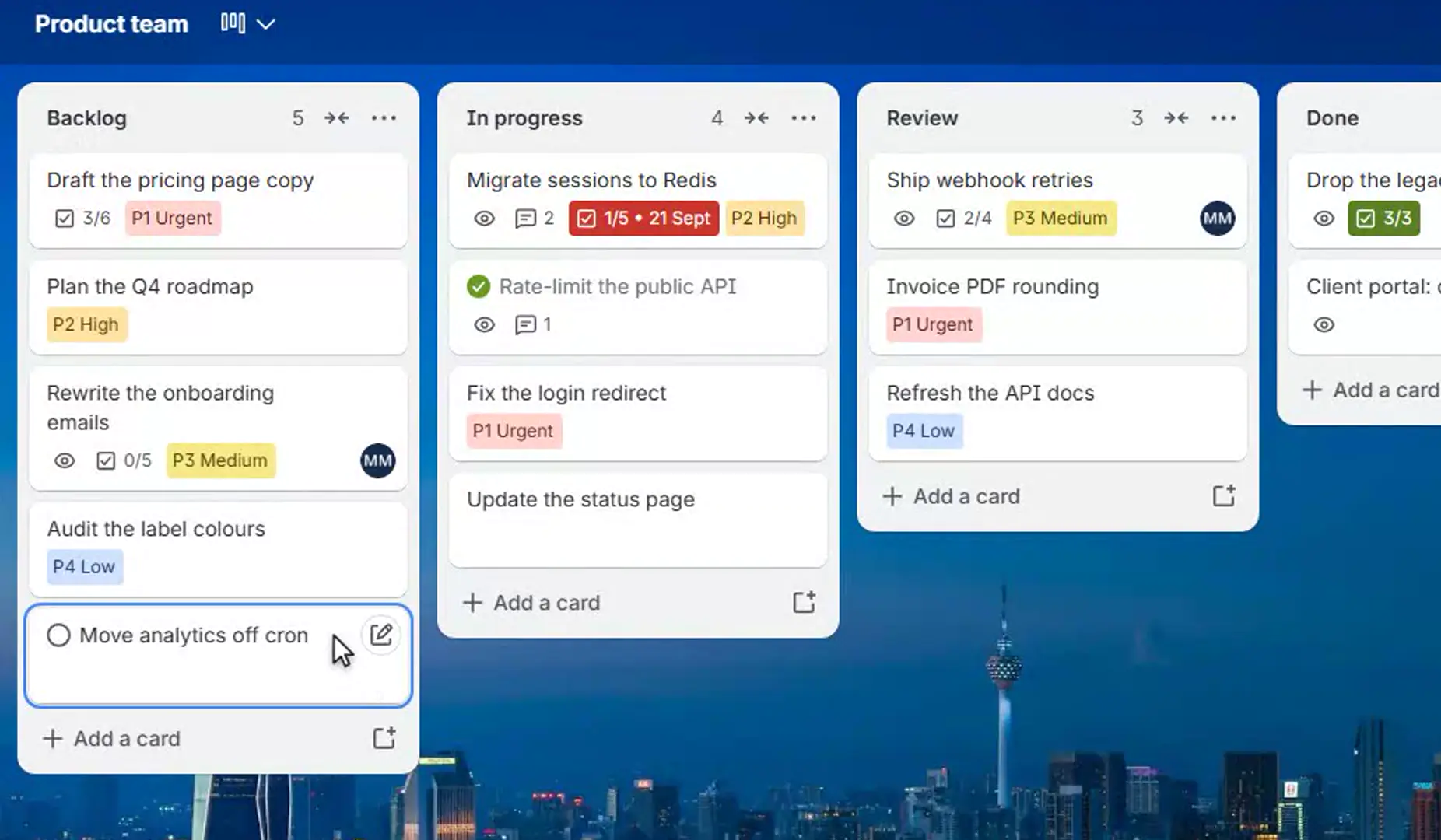
- Four levels on the card front. P1 Urgent in red, P2 High in orange, P3 Medium in yellow and P4 Low in blue. A card without a priority carries no badge.
- Two clicks from the card. The Priority button, or the badge on the back of the card, opens the four levels; one click sets it. Clear appears once there is something to clear.
- Sort by priority in every list's own Sort by menu: P1 first, then P2, P3 and P4, and cards without a priority at the bottom in the order they already had. Like Trello's own sorts, it runs once, when you ask.
- Your names and colours. Call the levels Now, Next, Soon and Someday if that is how your team talks: up to 20 characters a name and eight colours from Trello's badge palette. The P-number stays in front.
- The P1 count. The board button reads "Card Priority · 3 P1" and lists those cards, one click from each. That is how you find all P1 cards when Trello's filter can't.
Priorities, names and colours are stored on the board, so a P1 reads the same for everyone. Observers see the badges but Trello doesn't let them change one. There is no account and no authorization step, and nothing is sent to our server.
Its limits are the Power-Up ones above: the board filter and search don't see the priority, and it has no reports. If priority has to drive automation rules or a Dashcard count, a Custom Field on Standard is the better fit.
Which one to pick
- On Free, and you mostly filter: labels, in one colour family.
- On Standard, and priority feeds automation or reports: a Number Custom Field, 1 to 4, so it sorts too.
- On any plan, and you want the urgent work at the top of the list: a Power-Up with a sorter. Ours is free.
Priority says what comes first; it doesn't say how long a card has waited. On a board where old cards are the real problem, our guide to finding stale Trello cards is the other half.
Which card do I do next?
Card Priority puts P1 to P4 on the front of every card and adds Sort by priority to every list's Sort by menu.
Add to TrelloFree · No card, no account · Four levels, your names and colours
Frequently asked questions
How do I set priority on a Trello card?
Trello has no priority field, so use priority labels on any plan, a Custom Field on Standard or higher, or a Power-Up that adds a priority badge. Labels are the quickest to set up; a Custom Field holds exactly one value per card; a Power-Up can add a priority sort to the list menu.
Can you sort Trello cards by priority?
Not by labels or a dropdown Custom Field. Trello sorts a list by name, due date, date created, or a date or number Custom Field, so a Number field with 1 for the most urgent sorts correctly. A Power-Up such as Card Priority adds Sort by priority to the list's menu on any plan.
Are Custom Fields free in Trello?
No. Custom Fields are available on Standard and higher plans, not on Free. As of October 2026 Standard costs $5 per user per month billed annually, or $6 billed monthly.
Can I filter a Trello board by priority?
By a priority label, yes, with the board filter. For a Custom Field, type the value into the filter's keyword box. Trello's filter doesn't read Power-Up data, so a Power-Up has to list those cards itself; Card Priority's board button lists the P1 cards.
Does sorting a Trello list keep it sorted?
No. Every sort, Trello's own or a Power-Up's, reorders the list once. New cards go wherever they are added, and there is no undo. Sort again when you plan, or use a scheduled automation to sort the list each day.